
Finding the right gaming mouse can make a noticeable difference in comfort, control, responsiveness, and overall gameplay. The five gaming mice featured here cover a wide range of needs, from feature-packed ergonomic designs and lightweight competitive options to budget-friendly wireless models and specialized MMO mice.
Whether you prioritize customizable controls, wireless freedom, palm-grip comfort, affordability, or a large number of programmable buttons, this guide breaks down the strengths and trade-offs of each option to help you choose a gaming mouse that fits your setup and play style.
1. Razer Basilisk V3 35K

The Razer Basilisk V3 35K is designed for gamers who want extensive customization without giving up ergonomic comfort. Its 4D scroll wheel supports horizontal tilting and configurable inputs, while the free-spinning mode provides smooth scrolling for everyday browsing and productivity. Its ergonomic thumb rest also gives the hand a generous support area during extended sessions.
Performance is another major part of the Basilisk experience. The 1,000Hz polling rate provides consistent responsiveness, while the overall design gives players plenty of control over their inputs. The larger ergonomic shape can be especially appealing to gamers who prefer a substantial mouse rather than an ultra-light design.
The main trade-off is its 103g weight. Players who prioritize extremely fast movements in competitive FPS games may prefer something considerably lighter. The extra front thumb button can also take some adjustment depending on hand position. For gamers who value comfort, versatility, and a broad set of configurable controls, however, the Basilisk V3 35K offers a feature-rich approach.
| Pros | Cons |
|---|---|
| Excellent customization | Relatively heavy |
| Comfortable ergonomic thumb rest | Front thumb button may require adjustment |
| Smooth 4D scroll wheel | Less suited to ultra-light FPS setups |
2. Logitech G Pro

The Logitech G Pro focuses on delivering competitive-grade wireless performance while keeping its appearance relatively understated. Its symmetrical, ambidextrous shape makes it adaptable, and the side-button arrangement can be configured for different hand preferences.
Its wireless design is particularly useful for players who want freedom from a cable while maintaining responsive gameplay. Testing described the polling performance as staying close to the 1,000Hz target, with occasional drops that are unlikely to be noticeable during normal play.
At around 80g, it is not the lightest competitive mouse available, and players pursuing the lowest possible weight may want something lighter. Battery charging is another consideration, with regular charging required depending on usage and lighting. Even so, the combination of wireless convenience, symmetrical ergonomics, and competitive-oriented performance makes it a versatile gaming option.
| Pros | Cons |
|---|---|
| Wireless freedom | Requires regular charging |
| Ambidextrous symmetrical design | Not among the lightest mice |
| Strong competitive performance | Wireless battery management adds maintenance |
3. Logitech G305

The Logitech G305 demonstrates that a wireless gaming mouse does not necessarily have to occupy the premium price category. It offers strong wireless gaming performance while keeping the design relatively straightforward, making it an appealing choice for gamers who want dependable functionality without a high-end feature list.
A USB extension cable can help position the wireless receiver closer to the mouse and away from potential interference sources. The scroll wheel also provides a tactile feel that can be useful in games where scrolling is frequently used for zooming, weapon selection, or menu navigation.
The biggest consideration is its weight. Compared with modern lightweight gaming mice, the G305 feels substantially heavier, which can help with deliberate movements but requires more effort for fast sweeps. Its shape may also take some experimentation, particularly for players with larger hands or those who frequently switch between palm, claw, and fingertip grips.
| Pros | Cons |
|---|---|
| Wireless performance at a budget-friendly level | Heavier than many modern gaming mice |
| Useful receiver extension | Shape may not suit every grip |
| Tactile scroll wheel | Less ideal for rapid sweeping movements |
4. Redragon M612 Predator RGB

The Redragon M612 Predator RGB emphasizes comfort and accessible gaming features. Its substantial shape and rubberized thumb area are designed to encourage a secure palm grip, making it particularly interesting for gamers who prefer a fuller mouse in their hand.
Its design can feel comfortable during relaxed gaming sessions, but the asymmetrical shape may be less natural for claw-grip users. The 110g weight also places it firmly in the heavier category, which can provide deliberate control but is less suited to players who prefer quick, low-effort mouse movements.
The most significant technical limitation is its 500Hz polling rate. That remains suitable for many casual gaming situations, but players focused heavily on competitive titles may prefer the faster polling rates found on the other mice in this guide. For general gaming and comfortable palm-grip use, however, the Predator offers a straightforward feature set.
| Pros | Cons |
|---|---|
| Comfortable palm-grip design | 500Hz polling rate |
| Rubberized thumb grip | 110g weight |
| Good fit for relaxed gaming | Asymmetrical shape may not suit claw grip |
5. Corsair Scimitar RGB Elite
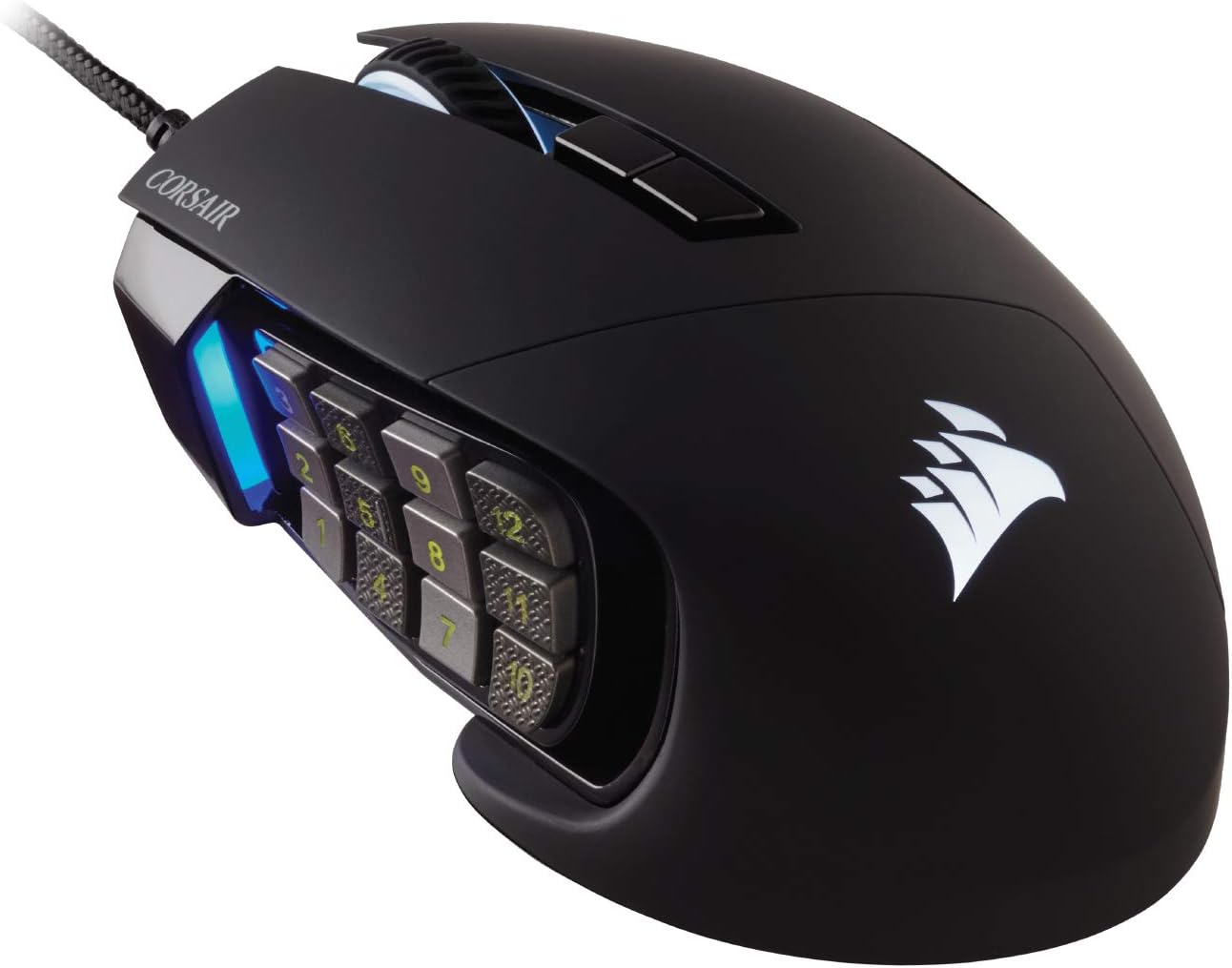
The Corsair Scimitar RGB Elite is built around the needs of MMO and MOBA players. Its defining feature is the thumb-accessible 12-button side keypad, giving players a large collection of readily accessible commands. The adjustable side-button positioning also makes the layout easier to adapt to different hand sizes.
Its 1,000Hz polling rate provides consistent responsiveness, while the substantial body and weight can make precise cursor placement feel controlled. For games with crowded hotbars, numerous abilities, and complex command layouts, the large button array can reduce the need to move between keyboard and mouse as frequently.
At 120g, the Scimitar is considerably heavier than lightweight gaming mice and can feel slow during rapid movements. Its scroll wheel may also feel louder and become stiffer with use. Those characteristics matter less in MMO-focused play, where the programmable side buttons and deliberate control are central to the experience.
| Pros | Cons |
|---|---|
| 12-button thumb keypad | Very heavy at 120g |
| Adjustable side-button position | Less suitable for fast FPS movement |
| Consistent 1,000Hz polling | Scroll wheel can be loud and stiff |
How to Choose the Right Gaming Mouse
Your ideal gaming mouse depends heavily on the games you play and how you hold your mouse. Competitive FPS players often pay close attention to weight, tracking, responsiveness, and shape. MMO players may place greater importance on programmable buttons and thumb access. For general gaming, comfort, reliable tracking, and a shape that suits your hand can be more important than having the maximum number of features.
- For customization: Consider a mouse with numerous configurable controls and an ergonomic layout.
- For wireless freedom: A capable wireless gaming mouse can eliminate cable drag while maintaining responsive gameplay.
- For value: A budget wireless mouse can provide strong performance without requiring a premium investment.
- For comfort: A larger ergonomic shape may work well if you prefer a relaxed palm grip.
- For MMO gaming: A dedicated side keypad can provide convenient access to numerous abilities and commands.
Final Thoughts
These five gaming mice take noticeably different approaches to gaming. The Razer Basilisk V3 35K emphasizes customization and ergonomic control, the Logitech G Pro focuses on wireless competitive performance and ambidextrous usability, and the Logitech G305 offers a simpler wireless option with strong performance characteristics. The Redragon M612 Predator RGB focuses on comfortable palm-grip gaming, while the Corsair Scimitar RGB Elite is tailored toward players who need a large collection of accessible programmable buttons.
Before buying, consider your preferred grip, typical game genres, desired weight, number of buttons, and whether wired or wireless operation better fits your setup. Matching those characteristics to your actual gaming habits is one of the most useful ways to narrow down the choices.
Related Posts

The Best Fitness Trackers: Top 5 Fitness Tracker Reviews & Buying Guide
Best Fitness Trackers: Top 5 Fitness Tracker Reviews & Buying…

The Best iPad Keyboard Cases: Top 5 Picks for Typing, Work & Everyday Use
If you want to turn your iPad into a more…

The 5 Best Humidifiers for Home: Dreo, Carepod & Blueair Compared
Finding the right humidifier can make a noticeable difference when…