
Choosing the right gaming chair can make long gaming sessions, workdays, and extended computer use much more comfortable. The best gaming chairs combine supportive seating, useful adjustment options, durable construction, and features that suit the way you actually sit.
To help narrow down the choices, this guide looks at five gaming and ergonomic chair options, ranging from premium models with advanced lumbar adjustment to affordable chairs designed for gaming, work, and relaxation.
Top Gaming Chairs at a Glance
Detailed Gaming Chair Reviews
1. AndaSeat Kaiser 3 Gaming Chair

The AndaSeat Kaiser 3 is built around comfort and extensive adjustability. Its thickly cushioned seat and supportive bolsters are designed for long periods at the desk, while the magnetic neck pillow adds a convenient way to position head and neck support. The chair also features internal lumbar adjustment for height and curvature.
One of the most useful features is the reclining system, which moves from 90 degrees to 165 degrees and provides five lockable positions. Its smooth rocking motion adds another layer of flexibility, making it easier to change positions throughout a long gaming or working session.
The adjustable armrests can be raised and rotated, while magnetic toppers provide additional customization. The chair has a solid overall construction, although users who prefer an especially soft seat may find the cushioning somewhat firmer. The Kaiser 3 Pro adds additional armrest adjustment, but at a higher price.
| Pros | Cons |
|---|---|
|
|
2. Razer Iskur V2 Gaming Chair

The Razer Iskur V2 focuses heavily on ergonomic adjustment and long-session comfort. Compared with the earlier generation, the chair offers a more refined seating experience, with dense cushioning designed to balance support and softness.
The backrest uses a racing-style shape while replacing overly rigid side bolsters with more comfortable foam. Its adaptive lumbar system is particularly notable because the support can move with your body as you turn. The lumbar adjustment also provides height and front-to-back control for more precise positioning.
Four-dimensional armrests provide additional positioning flexibility, while the cushioned neck pillow adds another comfort feature. Setup is also relatively straightforward, making the Iskur V2 an appealing option for users who want extensive ergonomic customization without an overly complicated assembly process.
| Pros | Cons |
|---|---|
|
|
3. Dowinx Retro Series LS-6689S Gaming Chair
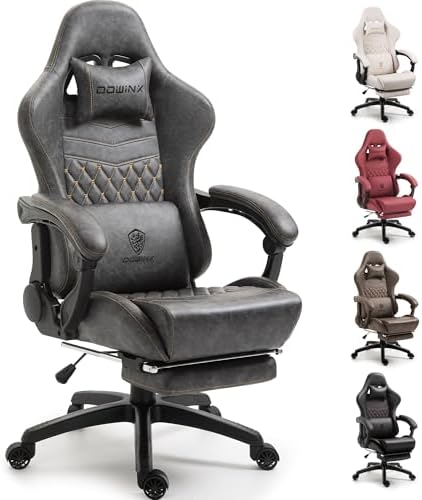
The Dowinx Retro Series LS-6689S combines gaming-chair styling with a selection of useful comfort features while keeping the focus on value. Its faux-leather upholstery provides a softer feel than some comparable coverings, while the seat cushioning aims to provide a balance between softness and firmness.
The armrests offer several adjustment directions, including height, swivel, forward and backward movement, and inward and outward positioning. This gives users multiple ways to find a comfortable arm position during gaming or computer work.
A padded footrest adds another relaxation feature, although it may not extend as far as some users would prefer. The chair can recline from approximately 165 degrees toward a flat 180-degree position when unlocked, making it useful for taking breaks or relaxing between gaming sessions.
| Pros | Cons |
|---|---|
|
|
4. GTPlayer GT800A Gaming Chair with Footrest

The GTPlayer GT800A is aimed at shoppers looking for a more affordable gaming chair with comfort-oriented features. It includes movable lumbar and neck pillows and a footrest that can provide additional support when you want to lean back and relax.
The chair offers a measured recline of approximately 135 degrees. Unlike the AndaSeat Kaiser 3, it does not provide the same type of tilt functionality, but its reclining design still makes it useful for taking breaks between gaming sessions. The available lumbar pillow also incorporates a massage function.
Its two-point pivoting armrests can move with the recline, although they do not provide the extensive independent adjustment found on more premium chairs. The available comfort experience is suited to shorter sessions, with testing indicating that around five hours is a practical comfort limit for some users. For shoppers replacing a basic office chair on a budget, it remains a feature-rich option.
| Pros | Cons |
|---|---|
|
|
5. Modway Articulate Ergonomic Mesh Office Chair

The Modway Articulate Ergonomic Mesh is different from the other chairs in this guide because it is primarily an ergonomic office chair rather than a traditional racing-style gaming chair. Its low cost and straightforward ergonomic design make it worth considering for people who divide their time between work and gaming.
The mesh construction is useful for users who prefer a more breathable seating surface, particularly during long periods at a computer. Its adjustability and overall comfort are respectable for the price, although the backrest and seat are not designed to deliver the same level of specialized support or cushioning as premium gaming chairs.
The chair has less reclining capability and lacks some of the gaming-focused features found on models such as the GTPlayer GT800A or Dowinx LS-6689S. However, its office-friendly design can make it a practical choice for multitasking between productivity and gaming without needing an aggressively styled gaming chair.
| Pros | Cons |
|---|---|
|
|
How to Choose the Right Gaming Chair
When comparing gaming chairs, start with the features that matter most for your typical sitting routine. Lumbar adjustment is especially useful if you want to fine-tune lower-back support, while adjustable armrests can make a significant difference when switching between keyboard, mouse, controller, and mobile gaming.
Reclining capability is another important consideration. A chair with a deeper recline can be useful for relaxing or taking breaks, while a chair with multiple lockable positions provides more control over your preferred posture.
Also consider the upholstery and cushioning. Faux leather can provide a traditional gaming-chair appearance and feel, while mesh can offer greater breathability for people who spend long hours at a desk. Footrests, neck pillows, massage functions, and other extras can add convenience, but the basic fit and support of the chair should remain central to your decision.
Final Thoughts
These five chairs cover a broad range of gaming and computer-use needs. The AndaSeat Kaiser 3 and Razer Iskur V2 emphasize extensive ergonomic adjustment and long-session support, while the Dowinx Retro Series adds deep reclining and a footrest at a more value-focused level. The GTPlayer GT800A brings a footrest and massage feature into a budget-oriented design, while the Modway Articulate provides a more traditional office-chair approach for users who want a versatile work-and-gaming setup.
The right choice ultimately depends on your preferred seating feel, adjustment requirements, available space, budget, and how many hours you typically spend at your computer.
Disclosure: As an Amazon Associate, we may earn from qualifying purchases made through links on this page. Product availability, pricing, colors, and specifications may change on Amazon.
Related Posts

5 Best Cordless Phones for Clear Calls, Long Range & Easy Home Use
Finding the best cordless phone depends on more than just…

The 5 Best Wi-Fi Routers of 2026: Top Wi-Fi 7, Wi-Fi 6 & Mesh Routers Reviewed
Amazon Affiliate HTML Article Choosing the right wireless router can…

Top 5 Best Shower Speakers for Waterproof Bluetooth Sound
Finding the right shower speaker means balancing waterproof protection, sound…