Finding the right universal remote can make a home entertainment system dramatically easier to manage. Instead of juggling separate remotes for your TV, streaming player, soundbar, Blu-ray player, projector, or other AV equipment, a universal remote can bring essential controls together in one device.
In this guide, we compare five popular universal remotes, ranging from simple four-device models to advanced systems designed for complex home theater setups. We look at device compatibility, setup, customization, usability, and the features that matter most when replacing multiple remotes.
Quick Comparison of the Best Universal Remotes
| Product | Device Support | Backlight | Best For |
|---|---|---|---|
| Sofabaton U2 | Up to 15 | Yes | Complex home theater setups |
| GE 4-Device 48844 | Up to 4 | Yes | Simple everyday control |
| Philips SRP2024A/27 | Up to 4 IR devices | No | Fire TV and Roku setups |
| Sofabaton U2 Backlit | Up to 15 | Yes | Flexible AV control |
| Sofabaton X1S | Multiple IR, Bluetooth and Wi-Fi devices | Yes | Advanced home theater systems |
Detailed Universal Remote Reviews
1. Sofabaton U2 Universal Remote

The Sofabaton U2 is designed for users who need more control than a basic universal remote can provide. It can pair with up to 15 devices and uses an OLED display to show which device you are controlling, making it particularly useful for larger home theater systems.
Setup uses the Sofabaton companion app, which takes more effort than a simple code-based remote but opens the door to deeper customization. Programmable macros can combine multiple commands, such as powering on several components and switching inputs with a single button.
The U2 also offers compatibility across infrared and supported Bluetooth devices. Its combination of a display, programmable buttons, macros, and broad device support makes it a practical option for users who want a single remote without moving all the way to a premium hub-based system.
Pros and Cons
| Pros | Cons |
|---|---|
| Supports up to 15 devices | App-based setup takes extra time |
| OLED display and backlighting | Advanced customization has a learning curve |
| Programmable macros | Uses two AA batteries |
2. GE 4-Device 48844 Universal Remote
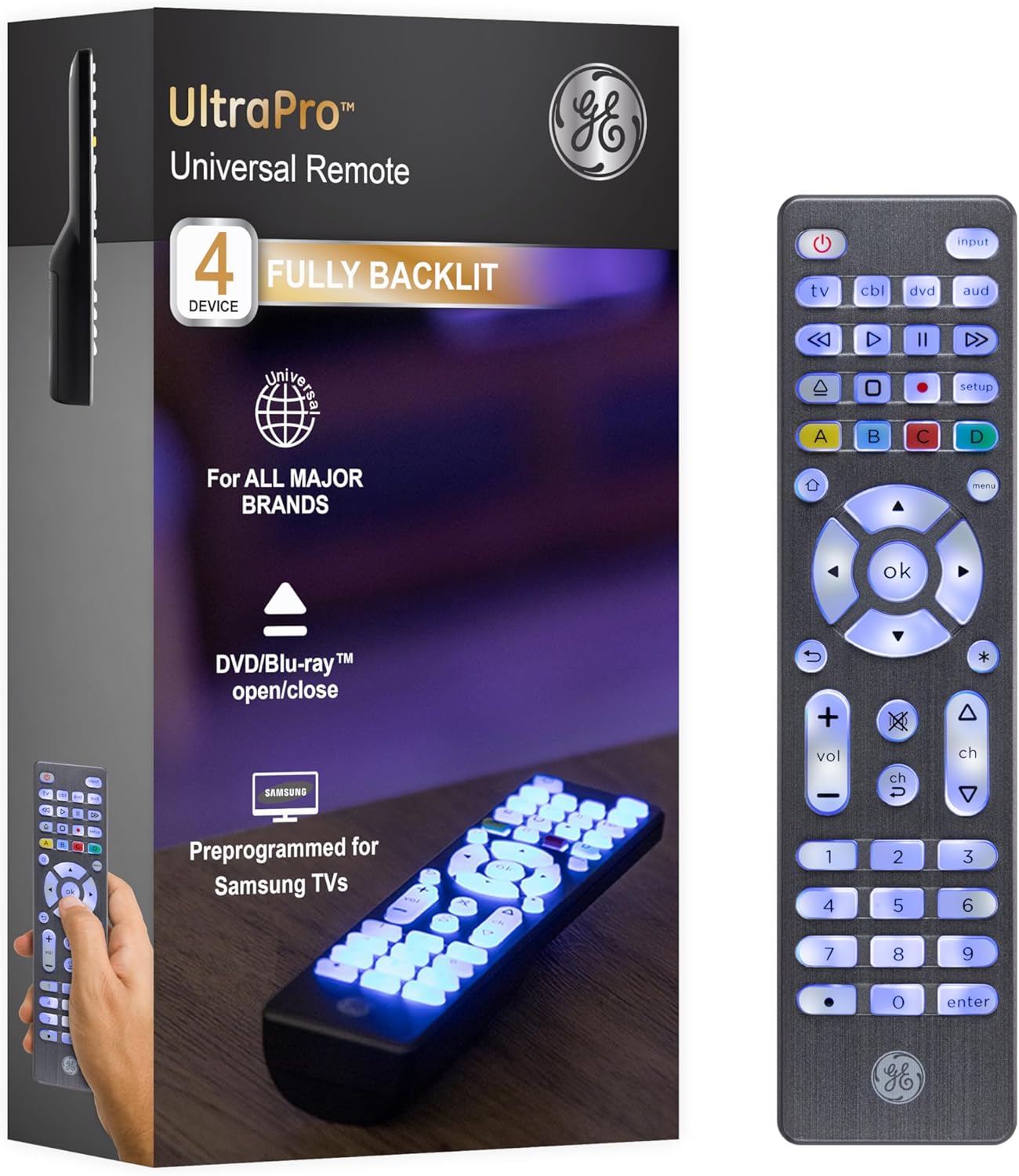
The GE 4-Device 48844 focuses on simplicity rather than advanced automation. It is designed to control up to four devices and is a good fit for a living room where you want to replace several conventional remotes without introducing a complicated setup process.
Programming is handled through the included code list, making the initial configuration relatively straightforward. The full backlighting is also useful when watching television or movies in a darker room, while the conventional button layout keeps everyday controls familiar.
For households that do not need macros, app-based customization, or extensive multi-device automation, the GE remote provides a more traditional approach. Its smaller device capacity is the main limitation compared with the more advanced Sofabaton models in this guide.
Pros and Cons
| Pros | Cons |
|---|---|
| Simple setup | Limited to four devices |
| Full backlighting | Fewer customization features |
| Traditional and easy-to-use layout | Not intended for complex automation |
3. Philips SRP2024A/27 Universal Remote

The Philips SRP2024A/27 takes a different approach by focusing on households built around streaming devices such as Amazon Fire TV or Roku. It can add control for up to four traditional infrared devices while working alongside a compatible streaming remote.
One of its useful design features is the storage slot on the back, which is intended to hold a second streaming-only remote. This can reduce the frustration of having to search for the streaming controller every time you switch between conventional AV equipment and a streaming interface.
Setup is designed to be straightforward, making this model suitable for users who want to simplify a relatively modest entertainment system without dealing with a sophisticated hub or extensive programming environment.
Pros and Cons
| Pros | Cons |
|---|---|
| Useful for Fire TV and Roku setups | Limited to four traditional IR devices |
| Built-in storage for a second streaming remote | No advanced hub-based automation |
| Straightforward setup | Less flexible for complex AV systems |
4. Sofabaton U2 Backlit Universal Remote Control
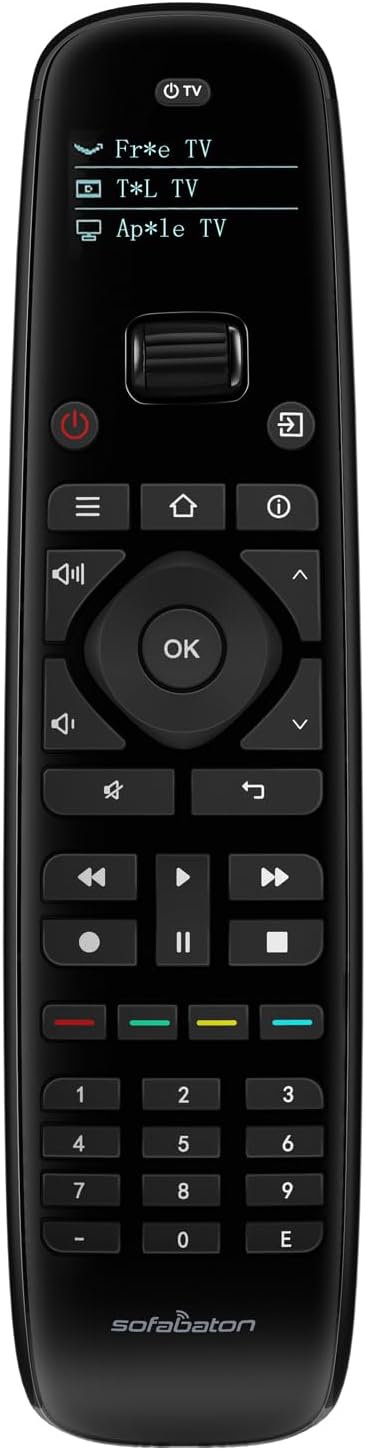
The Sofabaton U2 Backlit Universal Remote Control expands on the U2 concept with illuminated controls while retaining support for up to 15 devices. It can work with infrared and supported Bluetooth-based AV equipment, giving it considerably more flexibility than many basic universal remotes.
The layout is designed around quick access to frequently used controls, while the Sofabaton setup app provides customization options for individual systems. Users can also create activities and macros, although configuring more advanced routines requires some patience and familiarity with the app.
A key consideration is that the U2 does not provide dedicated activity buttons that automatically handle common routines in the same way as some more advanced systems. The U3 is also positioned as a newer-generation replacement with additional hardware features, but the U2 remains a less expensive way to get broad device control.
Pros and Cons
| Pros | Cons |
|---|---|
| Controls up to 15 devices | App has a learning curve |
| Backlit buttons | No dedicated activity buttons |
| IR and supported Bluetooth control | Advanced programming requires more effort |
5. Sofabaton X1S Universal Remote Control

The Sofabaton X1S is built for users who want a more advanced universal remote system. Unlike a basic handheld remote, the X1S combines a handheld controller with a hub that can manage equipment through infrared, Bluetooth, and Wi-Fi connections.
The remote features a large OLED display, backlighting, essential physical controls, and a rechargeable battery. The hub can also work with IR blaster cables, allowing compatible equipment to remain inside a cabinet while still receiving commands.
The system uses the Sofabaton setup app and provides a more advanced activity-based programming environment. The main trade-offs are its higher cost and a setup process that can require time and troubleshooting, particularly when a device is not represented perfectly in the code database.
Pros and Cons
| Pros | Cons |
|---|---|
| Hub-based system with broad connectivity | Higher price than basic remotes |
| IR, Bluetooth, and Wi-Fi control | Setup app has a learning curve |
| OLED display and rechargeable battery | Some device codes may require additional setup work |
How to Choose a Universal Remote
The best universal remote for your setup depends largely on how many devices you need to control and how much customization you want. If your system contains a television, soundbar, streaming box, and one additional component, a simple four-device remote may be enough.
For larger home theaters, look for support for more devices, programmable buttons, macros, and compatibility with both infrared and supported wireless devices. A hub-based model can also be useful when your equipment is stored inside a cabinet or when you want more sophisticated activity automation.
Backlighting is another useful feature if you regularly watch movies in a dark room. Meanwhile, an OLED or touchscreen display can make it easier to identify the active device and access less frequently used commands.
Final Thoughts
These five universal remotes cover a wide range of home entertainment needs. The Sofabaton U2 models focus on broad device support and customization, the GE 4-Device 48844 keeps things simple, the Philips SRP2024A/27 is designed around streaming-oriented setups, and the Sofabaton X1S adds a hub-based approach for more sophisticated AV systems.
Before purchasing, check the compatibility of your specific television, streaming device, receiver, soundbar, projector, or other equipment. Device support can vary, and advanced features may require additional configuration through the manufacturer’s app.
Affiliate Disclosure: This article contains affiliate links. If you purchase a product through one of the links, we may earn a commission at no additional cost to you.
Related Posts

The Best Chargers: 5 Top Charging Options for Phones, Laptops & More
Anker 735 Nano II 65W Check Price on Amazon Anker…

The 5 Best Water Dispensers for Easy, Convenient Household Hydration
Choosing the right water dispenser can make everyday hydration easier,…

The 5 Best Vacuum Cleaners of 2026: Top Cordless, Upright & Canister Picks
Choosing the right vacuum cleaner can make everyday cleaning faster,…