
Modern laptops and tablets are getting thinner, but that often means fewer built-in ports. A quality USB-C hub can quickly turn a single USB-C connection into a much more useful workstation, giving you access to USB-A accessories, external displays, memory cards, Ethernet, and pass-through charging.
In this guide, we look at five popular USB hubs designed for different needs. The Anker 341 focuses on everyday versatility, the UGREEN Revodok 105 offers an affordable way to add essential ports, the Anker 555 targets users who want wired Ethernet and high-speed connectivity, the Satechi Aluminum emphasizes premium desktop usability, and the Hiearcool USB C 7-in-1 is built with portability in mind.
Before buying, consider which ports you actually use, the data-transfer speeds you need, your display requirements, charging needs, and whether you prefer a compact travel hub or a more feature-rich desktop solution.
Quick Comparison: Best USB Hubs
How to Choose the Right USB Hub
USB hubs can look similar at first glance, but the port selection and performance can be very different. If you mainly need a mouse, keyboard, flash drive, or external storage, prioritize the number and speed of USB ports. If you connect a monitor, check the hub’s HDMI specifications and the maximum supported resolution and refresh rate.
Photographers and content creators should pay attention to SD and microSD card readers, while frequent travelers may prefer a smaller hub with only the ports they regularly use. For office setups, Ethernet and pass-through USB-C charging can be especially useful.
1. Anker 341 USB-C 7-in-1 Hub

The Anker 341 USB-C 7-in-1 is designed for users who want a practical collection of everyday ports without carrying a bulky docking station. Its combination of USB-A, USB-C data, HDMI, SD, microSD, and USB-C Power Delivery makes it a flexible option for home offices, study desks, and occasional travel.
One of its useful advantages is that the hub includes both USB-A connections and a USB-C data port. That means you can continue using modern USB-C accessories without sacrificing the only USB-C port on your laptop simply to connect the hub. Its USB data connections can support transfer speeds of up to 5 Gbps, making it suitable for common external storage and peripheral tasks.
The HDMI connection is designed for external displays, while the SD and microSD slots make the hub convenient for moving photos and other media. Pass-through charging is another helpful feature when the laptop has limited USB-C connections. Overall, this is a sensible choice for users who want a balanced port selection in one compact accessory.
| Pros | Cons |
|---|---|
|
|
2. UGREEN Revodok 105 5-in-1 USB-C Hub

The UGREEN Revodok 105 5-in-1 is aimed at buyers who want essential connectivity without paying for a large collection of premium ports. It provides HDMI, USB-C Power Delivery, and three USB-A connections, giving users a straightforward way to connect common accessories and external storage.
A particularly useful detail is that one of the USB-A ports supports USB 3.0 speeds of up to 5 Gbps, while the other two USB-A ports are intended for slower peripheral connections. This makes the hub more useful for file transfers than basic hubs that provide only USB 2.0 connections across the board.
The hub also supports HDMI output up to 4K at 30Hz and USB-C pass-through charging. For someone building a simple laptop workstation with a monitor, mouse, keyboard, and storage drive, the Revodok 105 provides a compact way to expand connectivity while keeping the setup relatively simple.
| Pros | Cons |
|---|---|
|
|
3. Anker 555 8-in-1 USB-C Hub
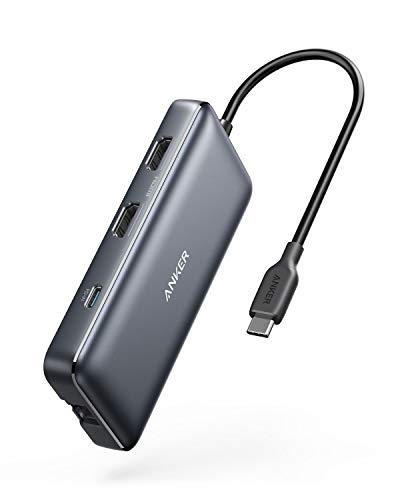
The Anker 555 8-in-1 is a more feature-rich option for people who need wired Ethernet alongside display output, USB connectivity, and memory card support. Ethernet can be especially useful in an office or travel environment where a wired network is preferred for consistency or where wireless connectivity is unreliable.
This hub provides a combination of USB-A and USB-C data connections, HDMI output, Ethernet, and SD and microSD card access. That makes it suitable for users who regularly move large files, connect multiple peripherals, work with external displays, or need a wired network connection from a laptop without a built-in Ethernet jack.
The product page associated with this ASIN currently identifies the model as the Anker 553 8-in-1 in some Amazon listings, while the supplied product data refers to it as the Anker 555. The ASIN is the same product link supplied for this article. Its broad feature set makes it particularly relevant for users who want a single USB-C accessory to handle several desktop and productivity tasks.
| Pros | Cons |
|---|---|
|
|
4. Satechi Aluminum Multi-Port Hub

The Satechi Aluminum hub takes a different approach by combining expanded connectivity with a premium desktop-friendly design. Its aluminum construction and wedge-style profile are particularly suited to modern laptops and clean workstation setups where appearance matters alongside functionality.
Connectivity is extensive, with HDMI, USB-A ports, SD and microSD card readers, Ethernet, and a USB-C Power Delivery connection. The combination makes it useful for MacBook users, photographers, office professionals, and anyone who wants a hub that can remain connected to a workstation rather than being used only as a basic travel adapter.
Its HDMI connection supports 4K output at up to 60Hz, while the multiple USB-A ports provide convenient access to wired accessories and storage devices. The front-accessible card slots can also be helpful for quickly importing photos and other media without reaching around the back of a laptop or desktop setup.
| Pros | Cons |
|---|---|
|
|
5. Hiearcool USB C 7-in-1 Hub

The Hiearcool USB C 7-in-1 is designed around portability. Despite its compact footprint, it provides two USB 3.0 Type-A ports, HDMI, SD and microSD card readers, and a USB-C Power Delivery charging connection. That combination makes it useful for travelers who need several common ports without carrying a larger docking station.
The two USB-A 3.0 connections support data transfer speeds up to 5 Gbps, while the SD and microSD readers make the hub convenient for photographers and users who frequently move files from memory cards. The HDMI port can also be useful when connecting a laptop or tablet to a television or external monitor while traveling.
Its main limitation is the number of accessories you can comfortably use at once. If your setup requires many simultaneous USB peripherals, Ethernet, or additional display connections, a larger hub may be more appropriate. For travel-focused users who mainly need quick access to storage, memory cards, charging, and HDMI, however, its small footprint is a practical advantage.
Hiearcool USB C 7-in-1 Specifications
| Total Number of Ports | 6 physical connections despite the 7-in-1 product name |
|---|---|
| USB Ports | 2 × USB-A 3.0 |
| Video | 1 × HDMI |
| Card Readers | 1 × SD and 1 × microSD |
| Charging | USB-C Power Delivery pass-through |
| Maximum USB-A Data Speed | Up to 5 Gbps |
| Host Connection | USB-C |
| Compatible Operating Systems | macOS, Windows, iPadOS, ChromeOS, Android |
| Pros | Cons |
|---|---|
|
|
Which USB Hub Fits Your Setup?
If you want a balanced hub for everyday laptop use, the Anker 341 provides a broad mix of commonly needed connections. For buyers focused on essential expansion at a lower cost, the UGREEN Revodok 105 concentrates on HDMI, USB-A, and charging.
If wired networking is important, the Anker 555/553 8-in-1 is the option in this selection that adds Ethernet alongside a broad collection of other connections. The Satechi Aluminum model is geared toward users who want extensive desktop connectivity combined with a premium aluminum design.
For frequent travelers, the Hiearcool USB C 7-in-1 keeps the feature set focused on the ports most useful away from home, including USB-A, HDMI, SD, microSD, and USB-C charging. Your ideal choice ultimately depends on the ports you use most often and how much portability you need.
Final Buying Checklist
- Check the host port: Make sure your laptop, tablet, or phone has a compatible USB-C port and supports the features you need.
- Check USB speeds: Not every USB-A port on a hub necessarily offers the same transfer speed.
- Check HDMI requirements: If you use a high-refresh-rate monitor, verify the hub’s supported resolution and refresh rate.
- Consider charging: USB-C Power Delivery pass-through can help keep a laptop charged while the hub is connected.
- Consider networking: Choose a hub with Ethernet if you regularly need a wired internet connection.
- Consider card readers: SD and microSD slots are especially useful for cameras, drones, phones, and removable storage.
- Think about portability: A small hub is easier to carry, while a larger multi-port hub may be better for a permanent desk setup.
Disclosure: As an Amazon Associate, qualifying purchases made through the Amazon links on this page may earn a commission at no additional cost to you.
Related Posts

The 5 Best Neck Fans for Powerful, Hands-Free Cooling
A good neck fan can make hot commutes, outdoor workouts,…

The 5 Best External Hard Drives for Fast, Reliable & Secure Storage
Choosing the right external hard drive can make backups, file…

The 5 Best Hot Rollers for Voluminous Curls, Body & Long-Lasting Style
Looking for the best hot rollers to create salon-style curls,…