
Looking for the best external drive for fast file transfers, backups, creative work, gaming, or everyday storage? This guide compares five standout portable storage options across 10Gbps, 20Gbps, USB4, and compact thumb-drive designs. From the Crucial X9 Pro to the ultra-fast LaCie Rugged SSD4, these drives cover different performance and portability needs.
Whether you need a dependable portable SSD, a high-speed USB-C thumb drive, or USB4 performance for demanding workloads, the options below give you several ways to match storage speed and design to your workflow.
For more storage-focused recommendations and buying resources, visit our best picks.
1. Crucial X9 Pro – Best 10Gbps External SSD

The Crucial X9 Pro is a strong choice for anyone looking for fast external SSD storage without moving into the higher cost of USB4-class drives. Its USB 3.2 Gen 2 interface provides up to 10Gbps connectivity, making it well suited to everyday file transfers, photo libraries, video projects, backups, and portable work.
The compact aluminum construction gives the drive a premium portable feel, while its IP55 dust and water resistance adds useful protection when the SSD is carried between home, office, studio, and outdoor locations. Its small footprint also makes it easy to keep in a laptop bag or camera kit.
For users who want a practical combination of speed, portability, and durability, the X9 Pro offers a well-balanced external SSD experience. It is especially suitable for people who have 10Gbps USB-C connectivity and do not need the much higher bandwidth of USB4.
| Pros | Cons |
|---|---|
| Fast 10Gbps performance | Limited by 10Gbps host connections |
| Compact and durable design | Not designed for USB4-level speeds |
| IP55 dust and water resistance | Higher-performance users may want 20Gbps or 40Gbps storage |
2. Teamgroup X2 Max – Best High-Performance USB Thumb Drive

The Teamgroup X2 Max targets users who want SSD-like performance in an extremely compact thumb-drive format. Its pocket-friendly design makes it convenient for carrying large files without the bulk of a conventional portable SSD.
Its internal NVMe-based storage architecture is designed to provide considerably stronger performance than ordinary commodity USB flash drives. The dual-connector approach is also useful for users who regularly move files between USB Type-C and traditional USB Type-A devices.
The X2 Max can be particularly useful for mobile professionals, students, photographers, and anyone who wants fast portable storage that can stay attached to a laptop or disappear into a pocket. Its compact form factor is the main attraction, although the higher performance comes at a premium compared with basic flash drives.
| Pros | Cons |
|---|---|
| Very compact thumb-drive format | Costs more than basic USB flash drives |
| NVMe-based internal storage | Performance depends on the connected port |
| USB-C and USB-A convenience | Small body can be easier to misplace |
3. Lexar SL600 – Best 20Gbps External SSD

The Lexar SL600 is designed for users who want to move beyond conventional 10Gbps external SSD performance. With USB 3.2 Gen 2×2 connectivity, it targets up to 20Gbps bandwidth and is well suited to demanding file transfers, video projects, large photo libraries, and other storage-intensive workloads.
The drive has a distinctive portable design with a large opening that can function as a carrying point or provide an attachment location for a lanyard. Its compact metal construction also gives it a premium appearance while remaining easy to carry.
One important consideration is connectivity. To achieve the intended 20Gbps performance, the host computer needs a compatible USB 3.2 Gen 2×2 port or suitable USB4 connection. On ordinary 10Gbps USB connections, the drive will operate at the lower interface speed.
| Pros | Cons |
|---|---|
| Up to 20Gbps interface | Requires compatible high-speed connectivity for maximum performance |
| Distinctive portable design | 10Gbps ports limit transfer performance |
| Five-year warranty | 20Gbps benefits are most useful for demanding workloads |
4. LaCie Rugged SSD4 – Best 40Gbps USB4 External SSD

The LaCie Rugged SSD4 is aimed at users who want very high external storage performance from USB4 or compatible Thunderbolt connections. Its 40Gbps interface makes it a particularly interesting option for professionals working with large video files, high-resolution media, and other demanding workloads.
The rugged orange enclosure is designed for portable use and carries an IP54 rating for protection against dust and water spray. Its bright color also makes the drive easier to spot inside a crowded equipment bag or on a busy desk.
Sustained performance is another notable feature, particularly for users transferring very large files. The drive can maintain strong write performance during extended workloads, making it relevant to videographers and other professionals who regularly work with large datasets.
| Pros | Cons |
|---|---|
| Very fast 40Gbps connectivity | Higher cost than conventional external SSDs |
| Rugged IP54-rated enclosure | Requires compatible USB4 or Thunderbolt hardware for maximum speed |
| Strong sustained performance | Port cover is not captive |
5. Addlink P30 – Best Budget USB4 External SSD
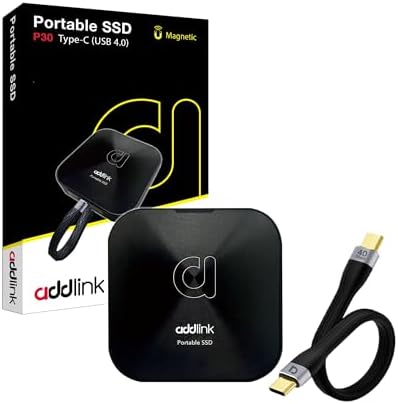
The Addlink P30 is designed for buyers who want USB4-class external SSD performance without necessarily moving into the highest-priced 40Gbps storage options. It offers a compelling combination of high bandwidth, compact dimensions, and practical features.
One of its most useful design features is the built-in magnetic ring, which allows the drive to attach directly to compatible metal surfaces such as a PC case. This can be convenient for users who want external storage that remains close to their workstation instead of sitting loose on a desk.
The P30 uses TLC NAND and is designed to maintain useful write performance after its secondary cache has been exhausted. That makes it a practical choice for heavier file-transfer workloads while retaining the convenience of a small portable SSD.
| Pros | Cons |
|---|---|
| USB4 high-speed connectivity | Maximum performance requires compatible USB4 hardware |
| Built-in magnetic mounting ring | Older USB connections reduce available bandwidth |
| TLC NAND with useful sustained write performance | USB4 benefits are unnecessary for basic file-storage needs |
How to Choose the Right External Drive
Before buying an external drive, check the USB port on your computer. A 40Gbps USB4 SSD cannot deliver its maximum potential when connected to a slower 5Gbps or 10Gbps port. Similarly, a 20Gbps USB 3.2 Gen 2×2 drive needs compatible host connectivity to reach its higher transfer speeds.
For everyday backups, documents, photos, and general portable storage, a 10Gbps SSD such as the Crucial X9 Pro can provide a strong balance of speed and portability. Users who frequently move very large files may benefit from moving up to 20Gbps or USB4 storage.
If durability is especially important, consider the physical protection offered by the enclosure. Drives with dust, water, and shock resistance can be more suitable for photographers, videographers, travelers, and professionals who regularly work away from a controlled office environment.
Final Thoughts
The best external drive depends heavily on the computer ports you have, the type of files you transfer, and how portable or rugged your storage needs to be. The Crucial X9 Pro focuses on practical 10Gbps performance, while the Teamgroup X2 Max emphasizes thumb-drive convenience. The Lexar SL600 moves into 20Gbps territory, and the LaCie Rugged SSD4 and Addlink P30 target USB4 users looking for substantially higher bandwidth.
Before ordering, verify the storage capacity, connector compatibility, and supported transfer standard for your specific computer or device. External SSD prices and availability can also change, so checking the current Amazon listing is recommended before purchasing.
Note: Commissions may be earned from the links below.
Related Posts

The Very Best Electric Toothbrushes: 5 Top Picks for a Cleaner, Healthier Smile
The Very Best Electric Toothbrushes: 5 Top Picks for a…

Top 5 Best Charging Stations for Multiple Devices: Reviews & Buying Guide
Top 5 Best Charging Stations for Multiple Devices: Reviews &…

Best 5 Pizza Ovens for Delicious Homemade Pizza
Choosing the right pizza oven can make a huge difference…