A great webcam can make a noticeable difference in video meetings, remote work, online classes, streaming, and content creation. The right model can deliver sharper detail, better framing, stronger low-light performance, and clearer voice pickup without requiring a complicated setup.
In this guide, we compare five webcams with different strengths, from the versatile Logitech Brio 500 and sharp Anker PowerConf C200 to advanced 4K options such as the OBSBOT Tiny 3, Elgato Facecam 4K, and Logitech MX Brio.
Top Webcams at a Glance
What to Look for in a Webcam
Resolution is one of the first specifications to consider. A 1080p webcam can provide a substantial upgrade over many built-in laptop cameras, while 4K models are useful when you want more image detail, cropping flexibility, or high-quality recordings.
Field of view also matters. A narrower view can keep the focus on one person, while a wider field of view can accommodate multiple people or show more of your workspace. Autoframing and tracking can be particularly useful when you move around during calls or recordings.
Finally, consider lighting, microphones, mounting, privacy features, software controls, and connection type. These details can affect everyday convenience just as much as resolution.
1. Logitech Brio 500

The Logitech Brio 500 is designed as a practical upgrade for everyday video calls, offering 1080p video and a field of view that can reach up to 90 degrees. Its dual microphones are designed to reduce background noise, helping voices remain easier to hear during meetings and conversations.
One of its useful features is the physical privacy shutter, which lets you cover the lens when the camera is not being used. Automatic aperture adjustment can also help compensate for changing lighting conditions, while Logitech’s RightSight auto-framing software can help keep you centered during supported video calls.
The main setup consideration is the adhesive mounting system. If the mount is positioned incorrectly, repositioning it can be inconvenient and may leave some adhesive residue. For users who want a straightforward 1080p webcam with practical call-focused features, the Brio 500 offers a well-rounded feature set.
| Pros | Cons |
|---|---|
| 1080p video | Adhesive mount can be inconvenient to reposition |
| Up to 90-degree field of view | May leave adhesive residue after repositioning |
| Privacy shutter and auto-framing support | RightSight requires Logitech software |
2. Anker PowerConf C200

The Anker PowerConf C200 focuses on delivering detailed video with 2K resolution. Its automatic aperture adjustment is designed to optimize the image as lighting changes, which can be useful for home offices where natural and artificial light may vary throughout the day.
Another highlight is its selectable field of view. You can use a 65-degree view for a tighter presentation, 78 degrees for a wider two-person frame, or 95 degrees when you want to capture more of the surrounding space. Its dual microphones also use AI-assisted processing to help reduce unwanted background noise.
Color reproduction can be a consideration for users who prioritize highly accurate colors, as some users have reported a washed-out appearance. On the convenience side, the fast-closing privacy cover is a useful feature for people who want an easy physical way to block the camera when it is not needed.
| Pros | Cons |
|---|---|
| Sharp 2K resolution | Colors may look washed out for some users |
| Three selectable viewing angles | Not designed primarily for color-critical work |
| AI-assisted dual microphones and privacy cover | Software features may require additional setup |
3. OBSBOT Tiny 3

The OBSBOT Tiny 3 is a more advanced option for creators and users who want 4K video and intelligent camera movement. Its 4K capability provides detailed footage, while the wide aperture can help the camera capture clearer video in dimmer environments.
Its three-microphone arrangement combines one primary omnidirectional microphone with two directional microphones for voice capture. The camera also supports voice and gesture controls, giving creators another way to control framing and camera functions without constantly reaching for the computer.
One important limitation is the frame-rate difference between its recording modes. The camera can capture 4K at 30 FPS, while 1080p can reach 120 FPS. For presentations and highly detailed footage, 4K is useful, while fast-moving content may benefit from switching to the higher-frame-rate 1080p mode.
| Pros | Cons |
|---|---|
| 4K video capability | 4K is limited to 30 FPS |
| 1080p recording up to 120 FPS | Advanced controls may take time to learn |
| Voice and gesture controls | More features than casual callers may need |
4. Elgato Facecam 4K
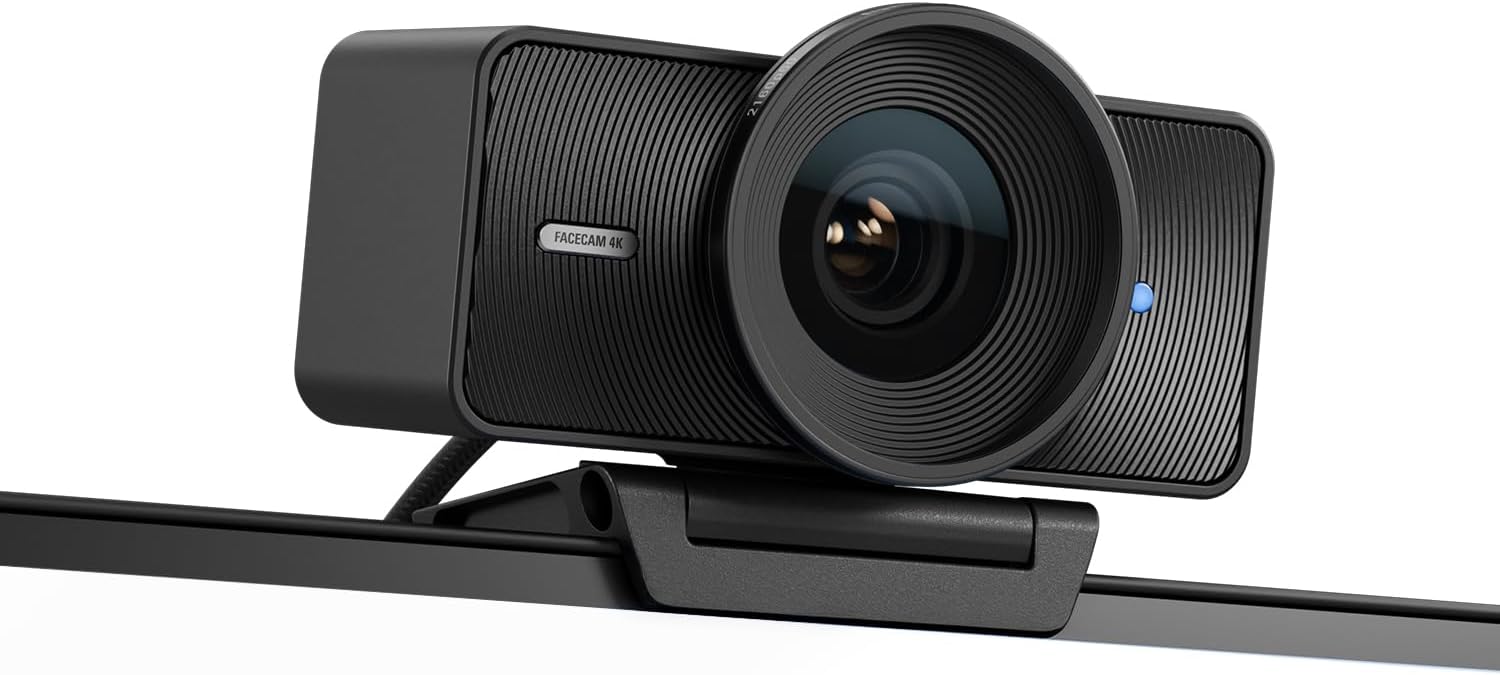
The Elgato Facecam 4K is built with video quality and creator controls in mind. It can record 4K video at 60 FPS, while also supporting 1080p and 720p at both 30 FPS and 60 FPS. That range gives users flexibility when balancing image detail, motion smoothness, and system requirements.
The camera provides a 90-degree field of view and allows manual adjustments such as shutter speed and ISO. These controls can be useful for streamers and creators who want more direct control over exposure and image appearance. Additional software features include cinematic effects and white-balance adjustments.
The biggest drawback is the absence of a built-in microphone, so users may need a separate microphone for audio. It also uses a USB 3.0 connection rather than USB-C. For creators already using an Elgato Stream Deck, programmable camera controls can make it easier to manage recording and streaming workflows.
| Pros | Cons |
|---|---|
| 4K at up to 60 FPS | No built-in microphone |
| Manual shutter and ISO controls | Uses USB 3.0 rather than USB-C |
| Strong software and creator controls | May be more advanced than needed for basic calls |
5. Logitech MX Brio

The Logitech MX Brio is a plug-and-play 4K webcam designed to work especially well with modern USB-C setups. It can record 4K video at 30 FPS or 1080p video at 60 FPS, giving users a choice between maximum detail and smoother motion.
Its padded clip system attaches to laptops, tablets, monitors, and other devices without adhesive. A physical privacy shutter can also be closed with a quick twist, making it convenient for people who regularly move between video calls and other tasks.
Beamforming microphones focus on sound coming from the front while reducing noise from other directions. However, compatibility is worth checking before purchase because Windows Hello is not supported, and low-light conditions can affect color reproduction. Users who frequently work in dim rooms may want to pay particular attention to lighting.
| Pros | Cons |
|---|---|
| 4K at 30 FPS and 1080p at 60 FPS | Does not support Windows Hello |
| USB-C connectivity and plug-and-play setup | Color reproduction can suffer in low light |
| Physical privacy shutter and beamforming microphones | Best results require adequate lighting |
Final Thoughts
The five webcams in this guide cover a range of video-call and content-creation needs. The Logitech Brio 500 focuses on everyday calling features, while the Anker PowerConf C200 offers 2K detail and flexible framing. The OBSBOT Tiny 3 adds intelligent controls and high-frame-rate 1080p recording, while the Elgato Facecam 4K emphasizes 4K60 video and manual creator controls. The Logitech MX Brio combines 4K video, USB-C connectivity, a physical privacy shutter, and beamforming microphones.
Before buying, consider the resolution you actually need, your room lighting, field-of-view requirements, microphone preferences, connection type, and whether you need advanced tracking or manual camera controls. Checking the latest Amazon listing details is also recommended because availability, pricing, and configurations can change.
Affiliate Disclosure: As an Amazon Associate, we may earn from qualifying purchases made through links on this page. Product prices and availability may change.
Related Posts

5 Best Cantilever Umbrellas for Comfortable Outdoor Living
A good cantilever umbrella can transform a patio, deck, poolside…

The Best Samsung Smartphones to Buy: Top Galaxy S25, S25 FE, A56 5G & Z Flip7 Picks
Best Samsung Smartphones to Buy: S25 Ultra, S25 FE, A56…

5 Best Pickleball Shoes for Beginners: Comfortable, Supportive Court Picks
Choosing the right pickleball shoes can make a major difference…