If you want a simple way to bring order to drawers, pantry containers, files, cables, shelves, craft supplies, and storage bins, a good label maker can make a surprisingly big difference. The best label makers combine easy controls, clear printing, useful customization options, and durable labels so organizing does not become another chore.
We compared five popular label makers, ranging from straightforward keyboard-operated models to Bluetooth-connected machines designed for more creative and professional labeling. Whether you prefer a traditional standalone label maker or want to design labels from your phone or computer, these options cover a wide range of organizing needs.
Quick Look at the Best Label Makers
Detailed Label Maker Reviews
1. Brother P-Touch PT-D220 Label Maker

The Brother P-Touch PT-D220 is an excellent choice if you want a dependable label maker that works without relying on a smartphone or computer. Its compact design makes it easy to move around the home or office, while the built-in QWERTY keyboard gives you a familiar way to type labels directly on the machine.
Customization is one of its biggest strengths. The PT-D220 offers 14 fonts, 11 font styles, 99 frames, and more than 600 symbols, giving you plenty of ways to create labels for cabinets, folders, pantry containers, storage bins, cables, and other everyday items. It can also print vertically and supports durable Brother TZe laminated tapes.
The display allows you to preview your label before printing, including two lines of text. One limitation is that the display does not show the selected font in its actual style, so the printed result may look somewhat different from the preview. Even so, its straightforward operation and extensive formatting choices make it a strong all-purpose option.
| Pros | Cons |
|---|---|
|
|
2. Nelko Label Maker
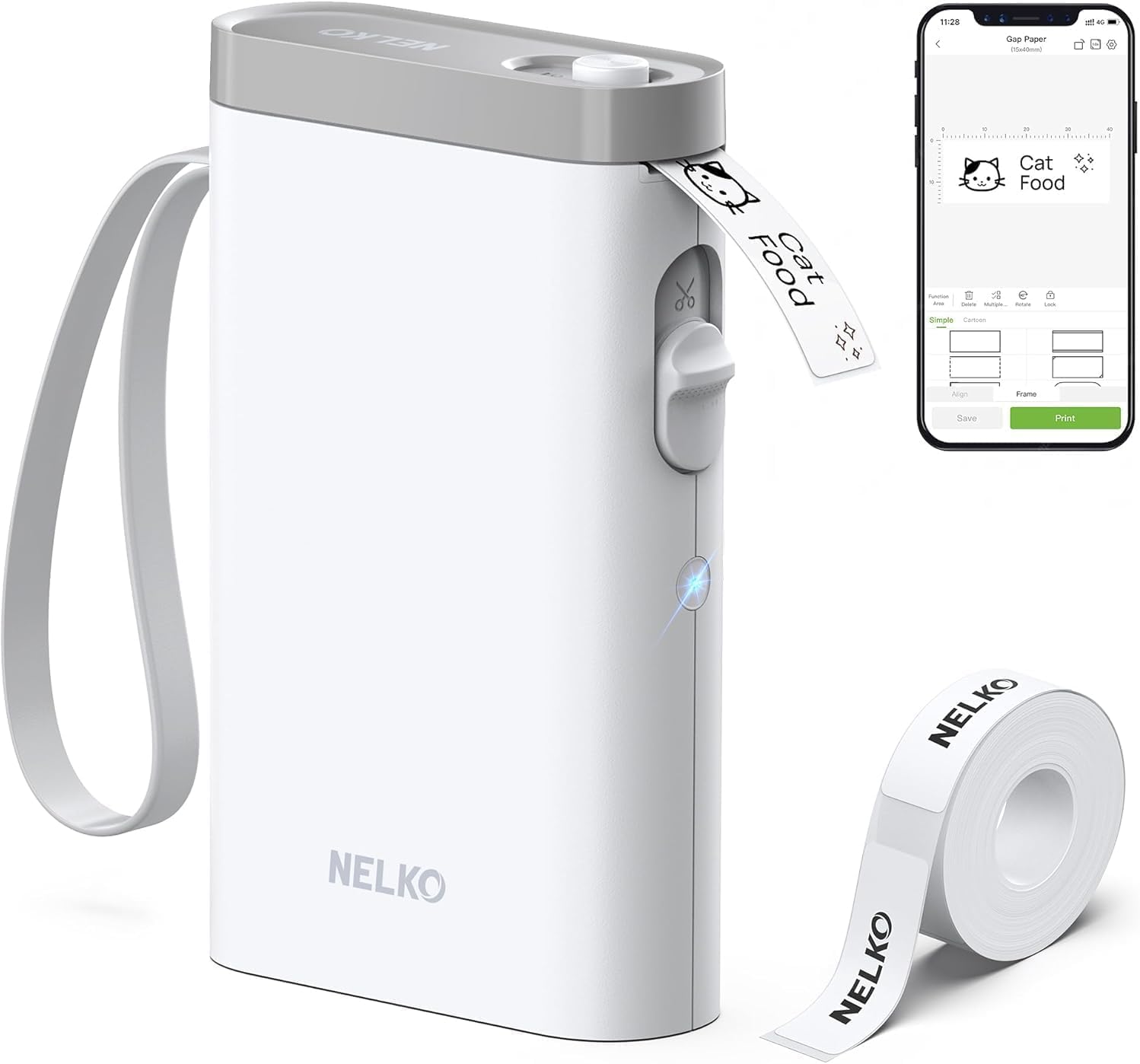
The Nelko Label Maker is a convenient option for anyone who prefers designing and printing labels from a smartphone. Its Bluetooth connectivity makes it possible to create labels through a mobile device instead of typing everything directly on the printer.
Its appeal goes beyond basic text printing. The system supports a wide range of fonts, languages, borders, icons, images, QR codes, and other design elements, making it useful for everything from kitchen organization to school supplies, storage containers, craft projects, and small-business labeling.
The slim portable design also makes it easy to carry between rooms or take with you when you need to organize several areas. If you enjoy creating more visually customized labels and want the convenience of phone-based editing, this is one of the most flexible choices in the group.
| Pros | Cons |
|---|---|
|
|
3. NIIMBOT B1 Label Maker

The NIIMBOT B1 is aimed at users who want more creative control than a basic handheld label maker provides. It connects to compatible devices and gives you a larger labeling area, making it particularly useful when you want more room for words, designs, or other information.
One of the most attractive features is its ability to support color printing, giving it an advantage for users who want labels to be more visually distinctive. Its companion app also provides numerous design elements and templates, helping you create labels without having to build every design from scratch.
The B1 is a strong fit for home organization, school supplies, office storage, retail tasks, and small-business applications. If your priorities are wider labels, customization, and a more modern app-based workflow, it offers considerably more creative freedom than simpler keyboard-only machines.
| Pros | Cons |
|---|---|
|
|
4. Brother P-Touch PT-D610BT Business Professional Connected Label Maker

The Brother P-Touch PT-D610BT is the most feature-focused desktop option in this lineup. It combines a full QWERTY keyboard with Bluetooth connectivity, giving you the flexibility to create labels directly on the machine or work from compatible devices.
Its desktop-oriented design makes sense for offices, workshops, storage rooms, retail environments, and other places where labeling is a frequent task. Support for different label sizes and a broader collection of design and formatting capabilities gives you more room to create professional-looking identification labels.
The ability to connect to a PC or Mac adds another layer of versatility, while the choice between an adapter and batteries makes the printer flexible for different workspaces. The tradeoff is its higher price compared with simpler label makers, so it makes the most sense for users who will actually take advantage of its expanded capabilities.
| Pros | Cons |
|---|---|
|
|
5. Brother P-Touch Cube Plus PT-P710BT

The Brother P-Touch Cube Plus PT-P710BT is designed for people who care about creating polished, professional-looking labels without needing a traditional keyboard-based machine. Its compact cube-style design keeps the hardware unobtrusive while allowing you to design labels through compatible mobile and computer software.
A major advantage is its versatility with tape widths. It can work with Brother TZe tapes ranging from narrow sizes suitable for small containers to wider formats that are better suited to storage boxes and larger organizational projects. That makes it useful throughout the home, from spice jars and cables to larger bins and shelves.
Bluetooth connectivity also makes it easy to move the label-making process to a phone or computer, where you can create more refined designs. For users who want attractive, consistent labels rather than a basic text-only appearance, the Cube Plus is a compelling choice.
| Pros | Cons |
|---|---|
|
|
Which Label Maker Should You Choose?
The Brother P-Touch PT-D220 is the best choice if you want a straightforward, reliable label maker with a physical keyboard and lots of built-in formatting options. It is especially appealing for everyday home and office organization.
The Nelko Label Maker is better suited to shoppers who prefer using a smartphone and want creative features such as icons, images, QR codes, and multiple design options.
The NIIMBOT B1 stands out for users who want wider, more customizable labels and additional creative flexibility, including color printing.
The Brother P-Touch PT-D610BT is the stronger professional desktop choice for frequent labeling, especially when Bluetooth, computer connectivity, a full keyboard, and multiple label sizes are important.
Finally, the Brother P-Touch Cube Plus PT-P710BT is an excellent option when polished-looking labels and flexible tape widths matter more than having a built-in keyboard.
Final Verdict
The best label maker depends on how you prefer to create labels. For simple, dependable organization with no app required, the Brother P-Touch PT-D220 is a particularly practical choice. For smartphone-based customization, the Nelko and NIIMBOT models offer more creative freedom. If you need a professional desktop solution, the Brother PT-D610BT brings a more extensive feature set, while the P-Touch Cube Plus is a strong choice for sleek, polished labeling.
Whichever model you choose, having a dedicated label maker can turn everyday organization into a faster and more consistent process. From pantry shelves and storage boxes to office files and household supplies, the right label maker can help keep frequently used spaces easier to identify and maintain.
Related Posts

The 5 Best Water Dispensers for Easy, Convenient Household Hydration
Choosing the right water dispenser can make everyday hydration easier,…

The 5 Best Sewing Machines for Beginners and Experienced Sewists
Choosing the right sewing machine can make sewing projects faster,…

The 5 Best Headphones Under $200 for Exceptional Sound, ANC & Gaming
Finding the best headphones under $200 means balancing sound quality,…